Snack Video Downloader
No Watermark
Save your favorite Snack Video clips as MP4 or MP3 — clean, with no logo stamped on the video. Just copy the link from the app, paste it in the box below, and download. Everything runs in your browser, with no extra app to install and no login.
What Is Snack Video Downloader?
Snack Video Downloader is an online tool for saving videos from Snack Video to your device. Unlike the app's built-in save feature, which stamps a logo and the creator's username onto the video, this tool helps you save the video clean — or grab just its audio as an MP3, for example a trending song, a sound for your own edits, or a personal collection you want to rewatch offline.
The download quality follows the quality of the video the creator uploaded to Snack Video. There is no downloader app to install: open this page in Chrome, Safari, or any other browser and the tool is ready to use. Read more about this site on our About Us page.
Key Features
Clean Result, No Logo
Videos are saved without the Snack Video logo and without the username stamped in the corner.
Save as MP3
Only need the audio? Turn the video into an MP3 file for songs, talks, or short sounds.
No Extra App
No downloader app to install and no account to create. Everything works in your browser.
Free to Use
All the main features of this tool are free to use, right from this page.
Download the Thumbnail
The video's cover image can also be saved separately, alongside the MP4 and MP3 files.
Works on Every Device
Use it on an Android phone, iPhone, tablet, or computer — all you need is a browser and the internet.
How to Download Snack Video Videos
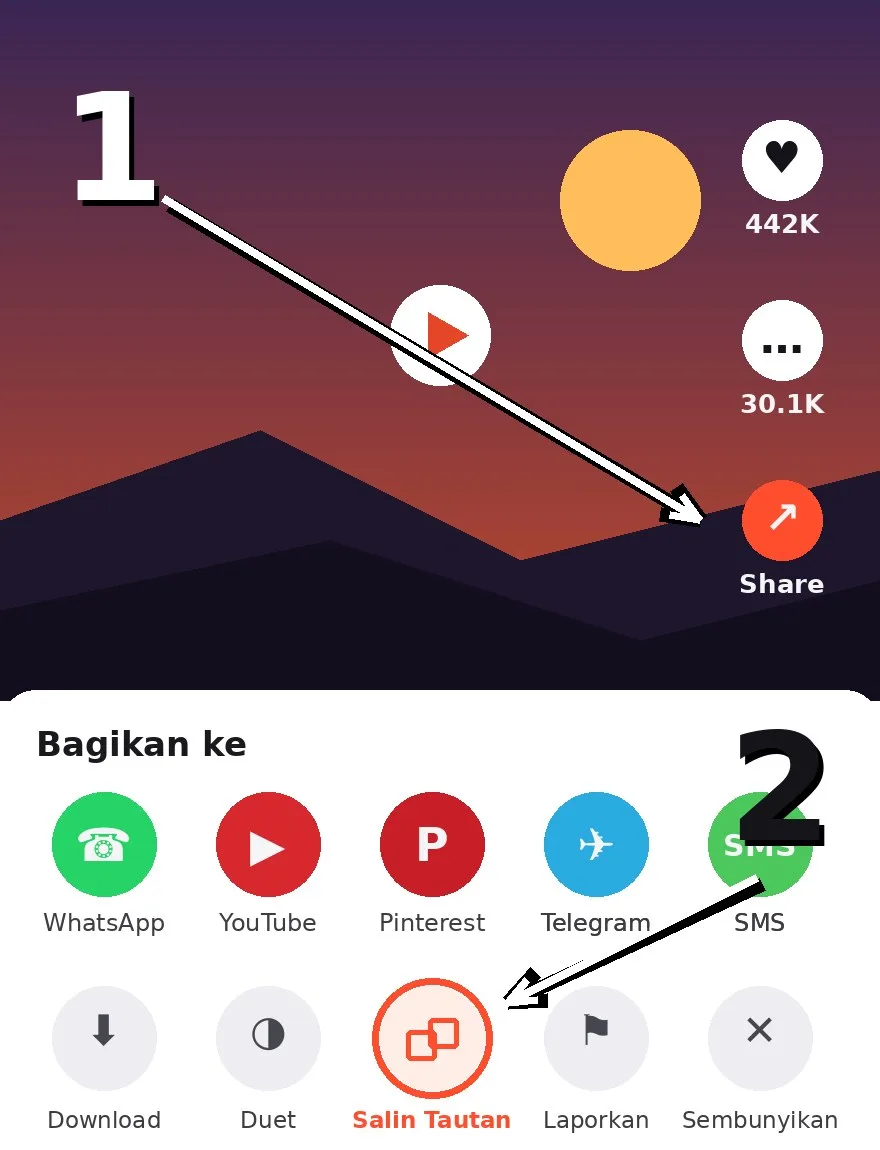
1Copy the Video Link
In the Snack Video app, tap the Share button on the video, then choose Copy Link.
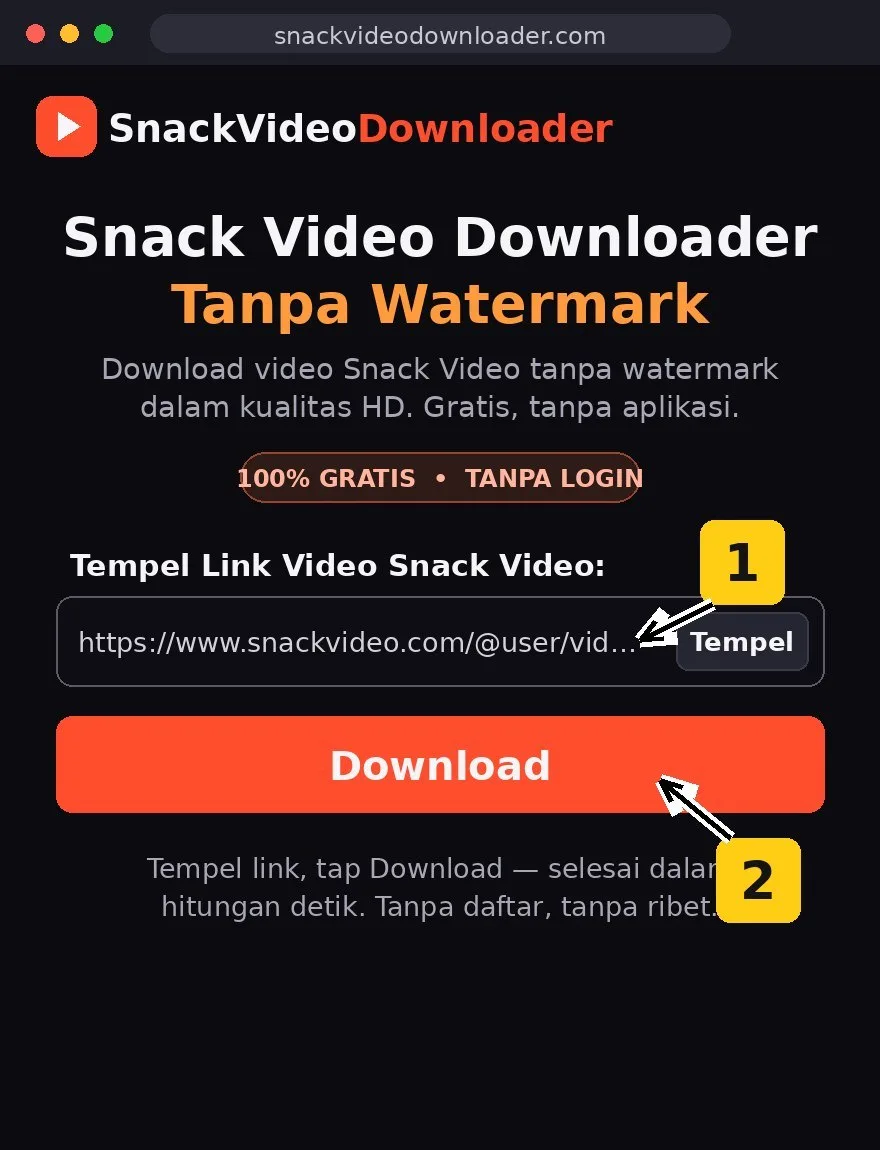
2Paste the Link
Paste the copied link into the download box at the top of this page, then tap the Download button.
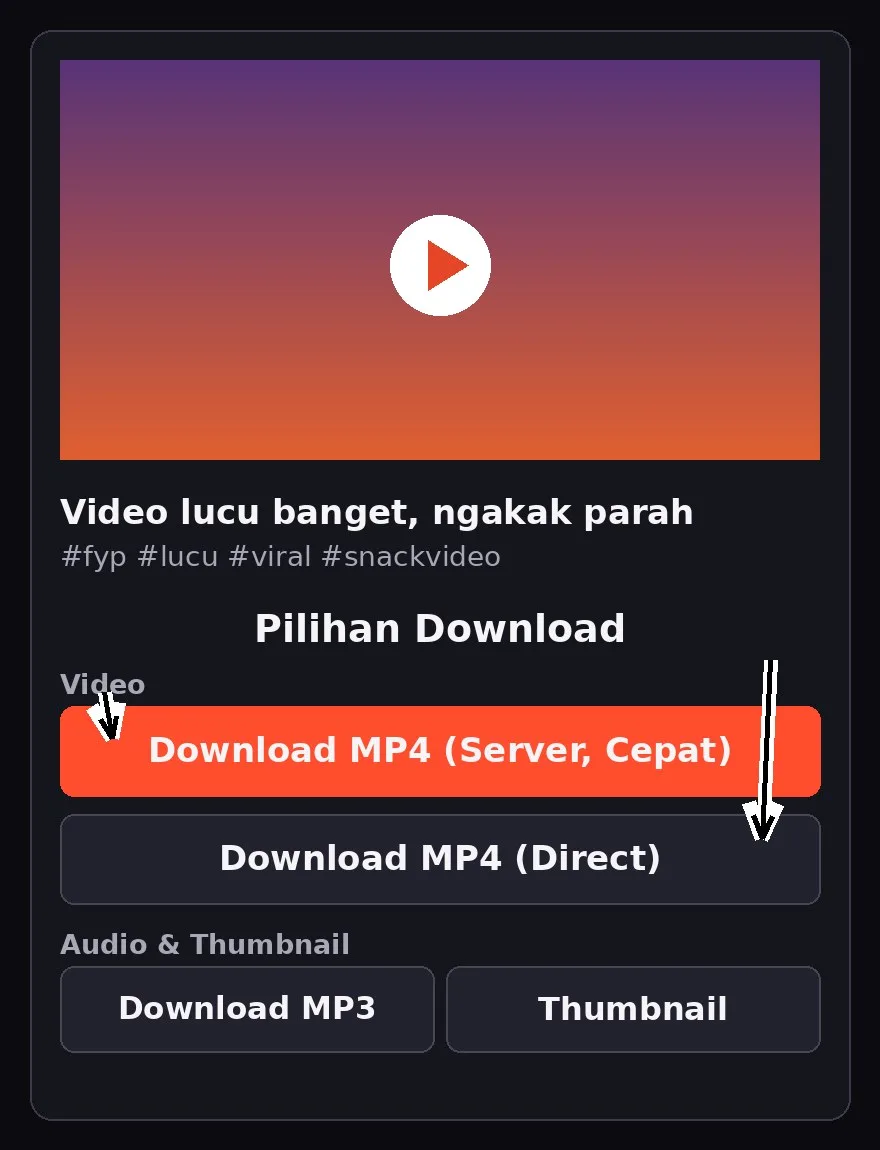
3Save the Video
Pick the format you want: a clean MP4, the MP3 audio only, or just the Thumbnail. Done!
Guides for Your Device
On Android Phones
Full steps using Chrome on Android (Samsung, Xiaomi, Oppo, Vivo, and more), plus where downloaded files are saved.
On iPhone
How to download through Safari and move the video from the Files app into the Photos app on your iPhone.
On PC / Laptop
On a computer it works the same way: open this page in Chrome, Edge, or Firefox, paste the video link, and save — the file lands in your Downloads folder.
Blog & More Guides
More articles and guides about downloading Snack Video videos are on our blog page.
Download Failed? Check These
If your download is not working, it is usually one of these:
- The link is incomplete or copied wrong — copy it again using the Share → Copy Link button inside the Snack Video app, not from anywhere else.
- The video is private or has been deleted — this tool can only process public videos.
- Your internet dropped mid-download — make sure your signal/Wi-Fi is stable, then try downloading once more.
- The MP3 feels slow — the MP3 file is created on the server first, so it can take up to about a minute. Keep the page open and wait until the download starts on its own.
- On iPhone, the video is not in Photos — Safari downloads go to the Files app first. Open Files → Downloads, then choose Save Video to move it into Photos.
- The page is not responding — refresh this page, then paste the video link again.
Ready to Save Your Favorite Videos?
Paste a Snack Video link and save it as MP4 or MP3 — free, in your browser, with no app to install.
⬆ Use the Tool NowFrequently Asked Questions (FAQ)
Is this tool free?
Yes, this tool is free to use. You do not need an account to download videos or MP3s.
Do I need to install an app?
No. Everything runs in the browser on your phone or computer — Chrome, Safari, Edge, or Firefox.
Why does the download come out clean, with no logo?
Videos saved through the app usually get a logo and username added to them. This tool takes the video from its source on Snack Video, so your saved copy is clean, without those overlays.
How do I save a video as MP3?
Paste the video link, tap Download, then choose the MP3 button. The audio file is created on the server first (usually up to about a minute), then the MP3 download starts automatically — keep the page open while it works.
Why did my download fail?
The most common causes: the link was copied wrong, the video is private or deleted, or your connection dropped. Copy the link again via Share → Copy Link in the Snack Video app, then try once more. See also the "Download Failed?" section on this page.
Can private videos be downloaded?
No. This tool can only process public videos.
Is this tool official from Snack Video?
No. SnackVideoDownloader is an independent tool and is not affiliated with Snack Video or JOYO Technology. See our About Us page for the full explanation.
Is downloading videos from Snack Video allowed?
Download only for personal, offline viewing. The copyright of each video stays with its creator — do not re-upload, sell, or use downloads commercially without the creator's permission.
Does it work on iPhone and PC?
Yes. On iPhone, open this page in Safari; downloads go to the Files app and can be moved into Photos. On a PC or laptop, use any browser and the file is saved to your Downloads folder.